Callbacks
Implementation Guide
In this guide, we will go through two examples of using the Callback system. In the first example, we will explore the system's reporting capabilities, while in the second, we will append additional information to the dataset in order to run a custom model.
Available Callbacks
WarpRec provides a set of built-in callbacks that are triggered at specific stages of the pipeline. WarpRecCallback is the base class for all WarpRec callbacks.
| Callback name | Origin | Description | Reference |
|---|---|---|---|
| on_data_reading | WarpRec | Invoked after data reading. | WarpRecCallback |
| on_dataset_creation | WarpRec | Invoked after dataset initialization. | WarpRecCallback |
| on_training_complete | WarpRec | Invoked after model training completion. | WarpRecCallback |
| on_evaluation_complete | WarpRec | Invoked after model evaluation completion. | WarpRecCallback |
WarpRec callbacks also inherit all the lifecycle hooks defined by the Ray Tune Callback class. For more details on those, refer to the Ray Tune documentation.
Reporting Example
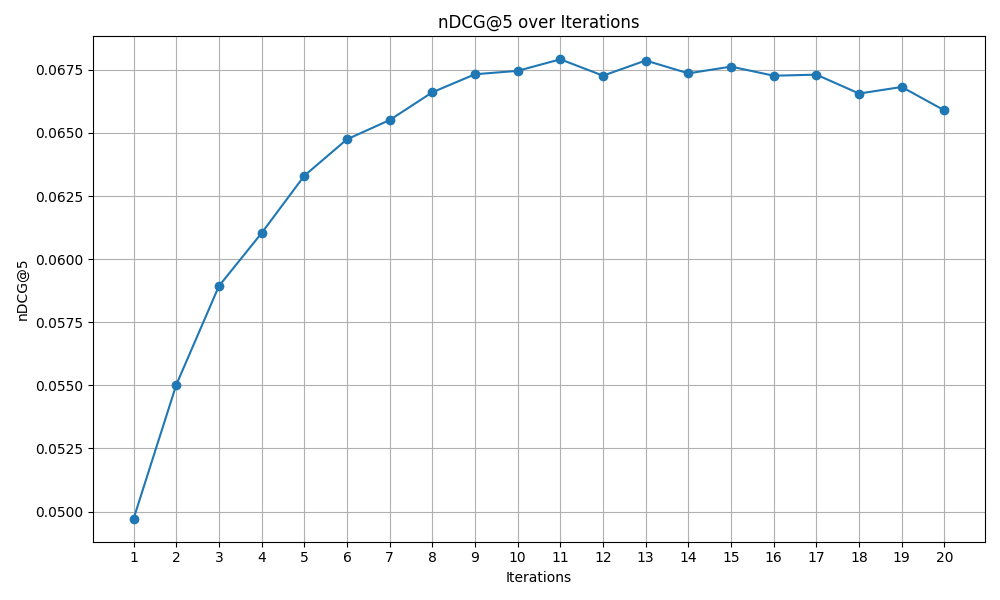
In this example, we track the nDCG@5 metric across iterations during the training of a NeuMF model.
Note
This is a minimal example. The same result can be achieved using any of the pre-configured dashboards.
The callback must inherit from WarpRecCallback.
from warprec.utils.callbacks import WarpRecCallback

class ComputeNDCGOverIterations(WarpRecCallback):

    def __init__(self, *args, **kwargs):
        self._save_path = kwargs.get("save_path", None)
        self._ndcg_scores = []
This constructor initializes the callback by retrieving the plot save path from kwargs and preparing a container for metric scores.
Next, track metric values during training. Recall that WarpRecCallback inherits the Ray Tune lifecycle hooks, including on_trial_save.
    ...

    def on_trial_save(self, iteration, trials, trial, **info):
        ndcg_score = trial.last_result.get("nDCG@5", 0.0)
        self._ndcg_scores.append(ndcg_score)
In this scenario, only nDCG@5 is monitored. For tracking multiple metrics simultaneously, the full_evaluation_on_report feature can be used.
Finally, generate and save the plot in the on_training_complete hook, which is invoked after model training concludes.
    ...

    import matplotlib.pyplot as plt

    def on_training_complete(self, model, *args, **kwargs):
        iterations = list(range(1, len(self._ndcg_scores) + 1))
        plt.figure(figsize=(10, 6))
        plt.plot(iterations, self._ndcg_scores, marker='o', linestyle='-')

        plt.title('nDCG@5 over Iterations')
        plt.xlabel('Iterations')
        plt.ylabel('nDCG@5')
        plt.grid(True)
        plt.xticks(iterations)
        plt.tight_layout()

        if self._save_path:
            try:
                plt.savefig(self._save_path)
                print(f"Plot successfully saved to: {self._save_path}")
            except Exception as e:
                print(f"Error during the saving process in {self._save_path}: {e}")
            plt.close()
        else:
            plt.show()
That's it! You've now integrated a custom callback into the main training pipeline. This is the result on the MovieLens1M dataset.
Registering the Callback
The last step is to register the callback in the configuration file.
general:
  callback:
    callback_path: callbacks/my_callback.py
    callback_name: ComputeNDCGOverIterations
    kwargs:
      save_path: plots/nDCG_over_iterations.png
Custom args and kwargs can be passed via configuration. WarpRec does not validate these parameters; the user is responsible for ensuring correctness.
For this example, we used the following configuration for the NeuMF model:
NeuMF:
    mf_embedding_size: 64
    mlp_embedding_size: 64
    mlp_hidden_size: [32, 16, 8]
    mf_train: True
    mlp_train: True
    dropout: 0
    epochs: 20
    learning_rate: 0.0001
    neg_samples: 4
Stash Example
Callbacks can also inject code or data into the main training pipeline. Although custom scripts can achieve similar functionality, callbacks allow the same outcome while preserving configuration-based management.
For instance, to attach custom data to a dataset during experiment initialization, implement it in the on_dataset_creation hook:
from warprec.callbacks import WarpRecCallback

class CustomDataToStash(WarpRecCallback):

    def on_dataset_creation(self, main_dataset, val_dataset, validation_folds, *args, **kwargs):
        def add_custom_information(dataset):
            # Some code to read your custom data
            dataset.add_to_stash("custom_data", my_data)

        add_custom_information(main_dataset)
        add_custom_information(val_dataset)

        if len(validation_folds) > 0:
            for fold in validation_folds:
                add_custom_information(fold)
This ensures all datasets involved in the experiment are enriched with a stash entry containing custom data. See the stash documentation for further details.
Important
Due to WarpRec's distributed execution, loading data at model runtime may cause errors or undefined behavior. Using the stash ensures proper serialization and reproducibility.